
Release notes
What’s new in felixUnity
felixUnity is developed continuously. Here are the latest changes from every area, followed by all versions with their dates.
over 100changes live in September 2026
15+Production deployments per month
24/7In-house hotline
What’s new by area
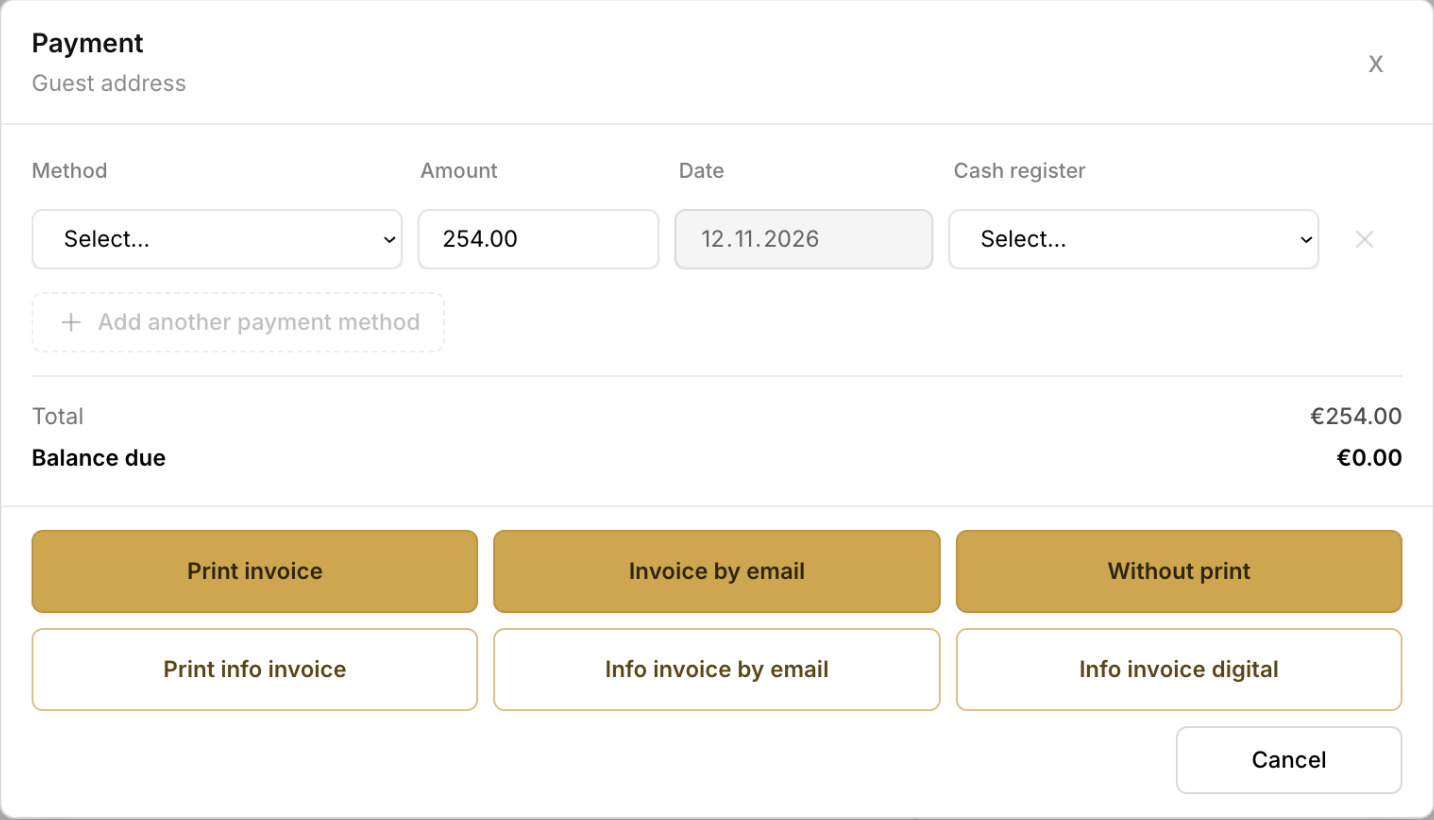
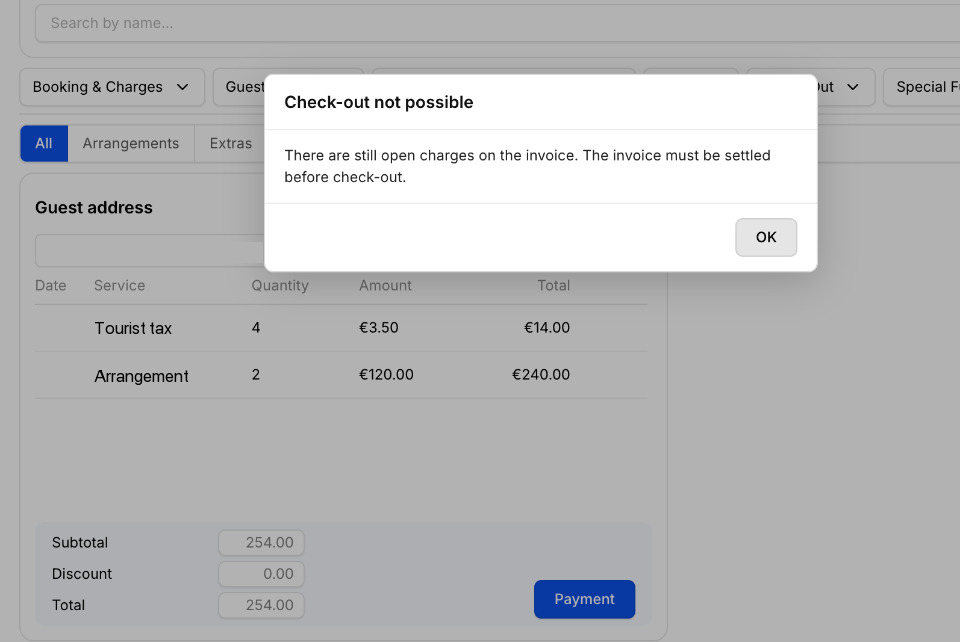
Payment check before check-out
- Before check-out, the booking is checked for full payment
More settings for guest registration
- Guest registration reporting offers more settings
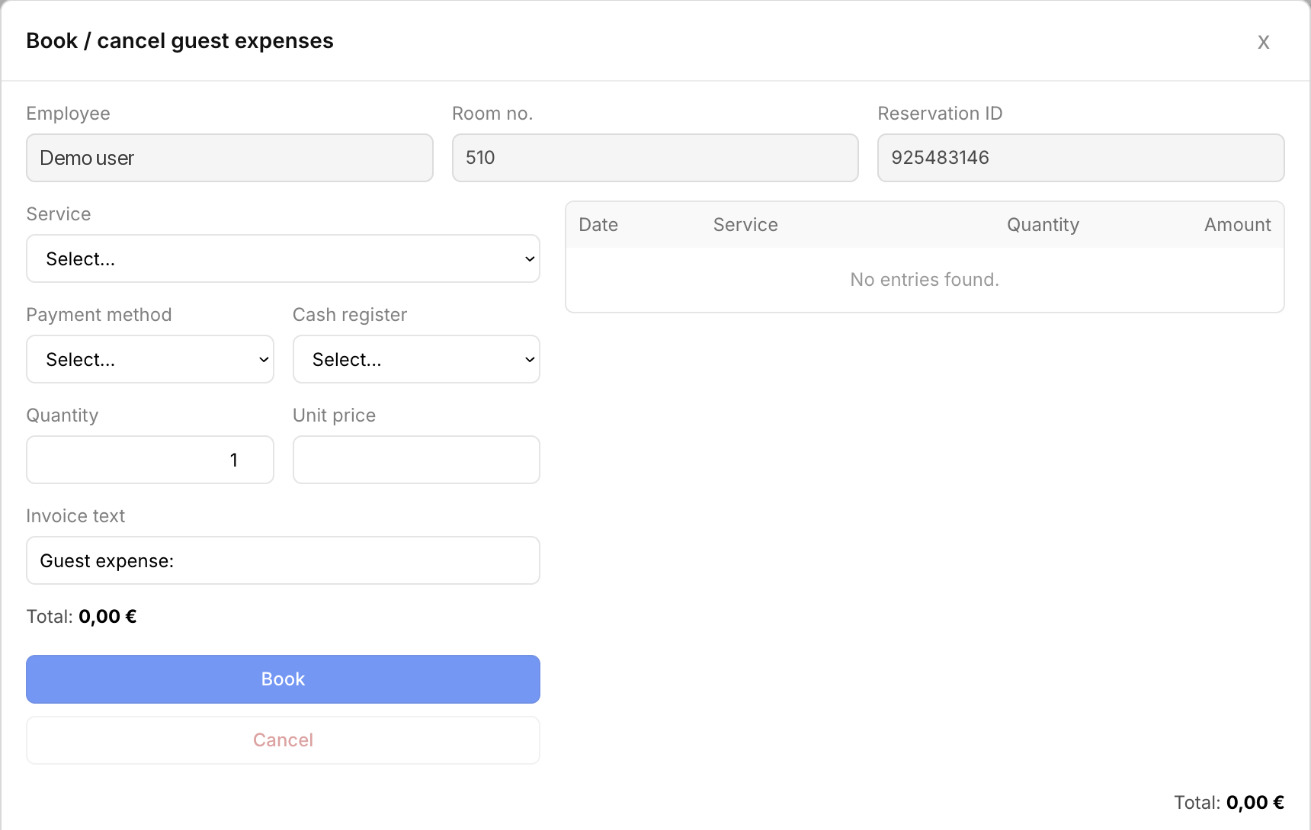
Book the right guest expenses
- The dialog for booking guest expenses shows only matching expense items
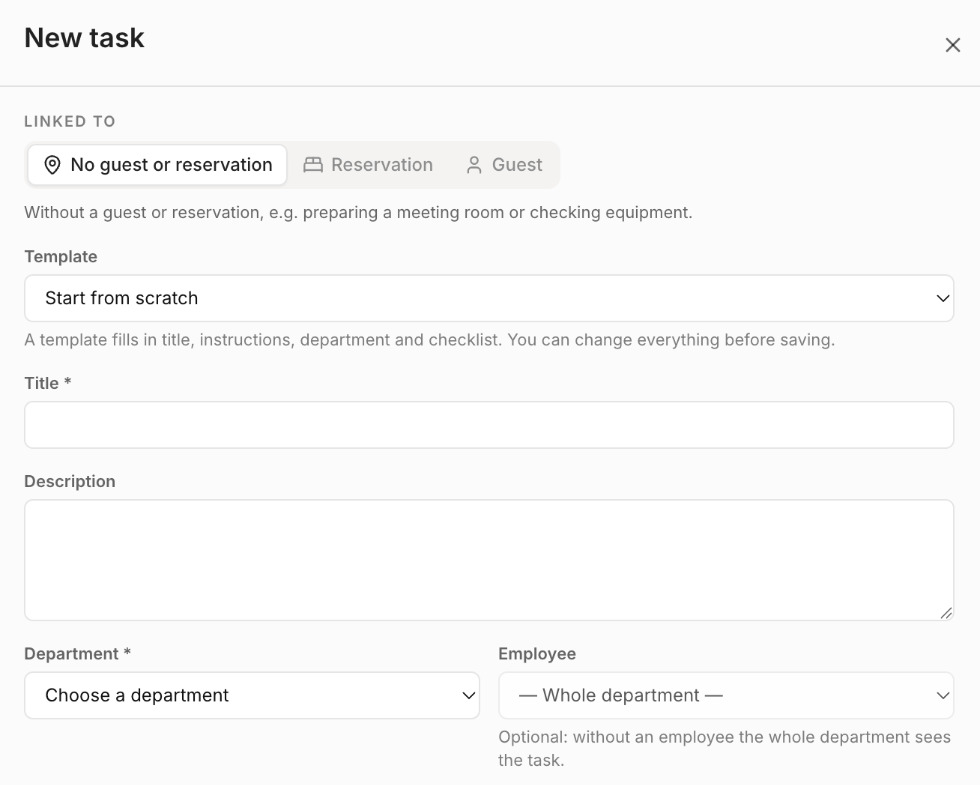
Tasks module integrated in felixUnity
- The Tasks module is integrated and can be used from other modules, with direct links to tasks
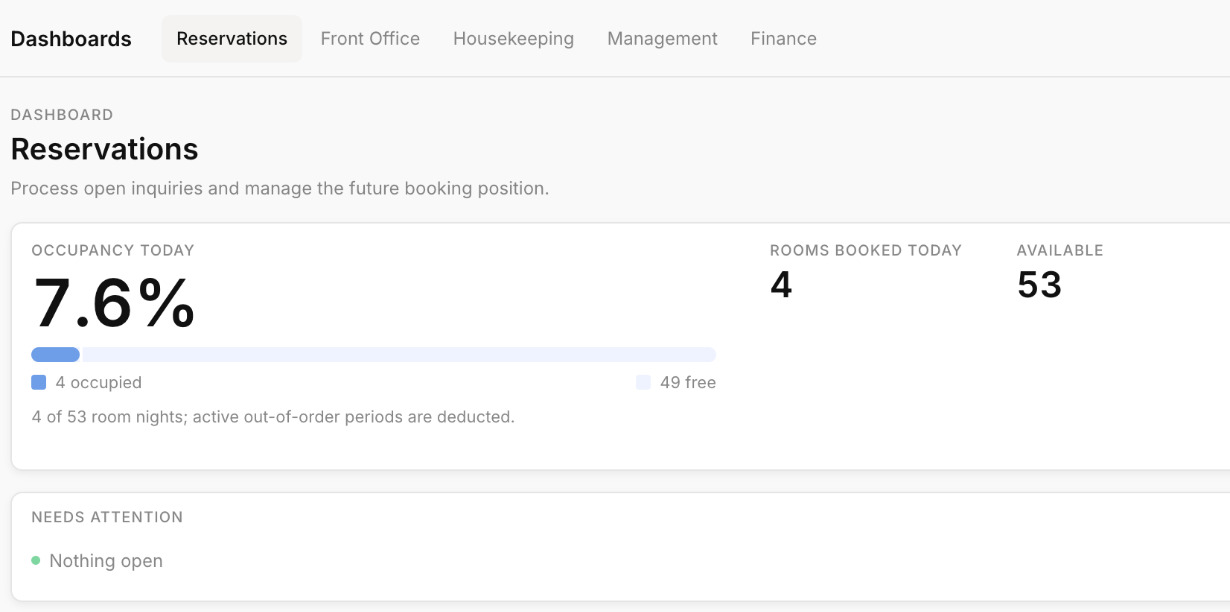
Redesigned dashboard
- The dashboard has been redesigned around the four key questions of a hotel manager: Today, Occupancy, Rooms and Finance
- The previous five department views are available again, including the Management page with the key figures
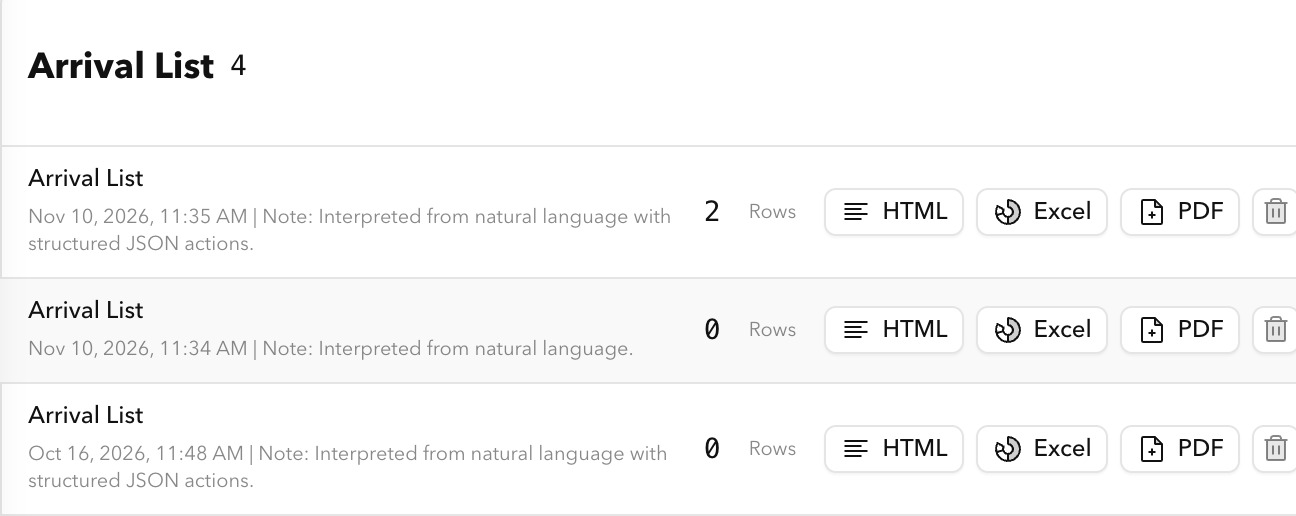
Send the arrivals list by email
- The arrivals list can be sent by email with a new shortcut
Create rooms by voice command
- Rooms can be created by voice command, and a card for approval appears before they are created
Answers with a source
- Answers from house knowledge always name their source
Current AI models
- Current AI models are supported, so answers become more precise and reliable
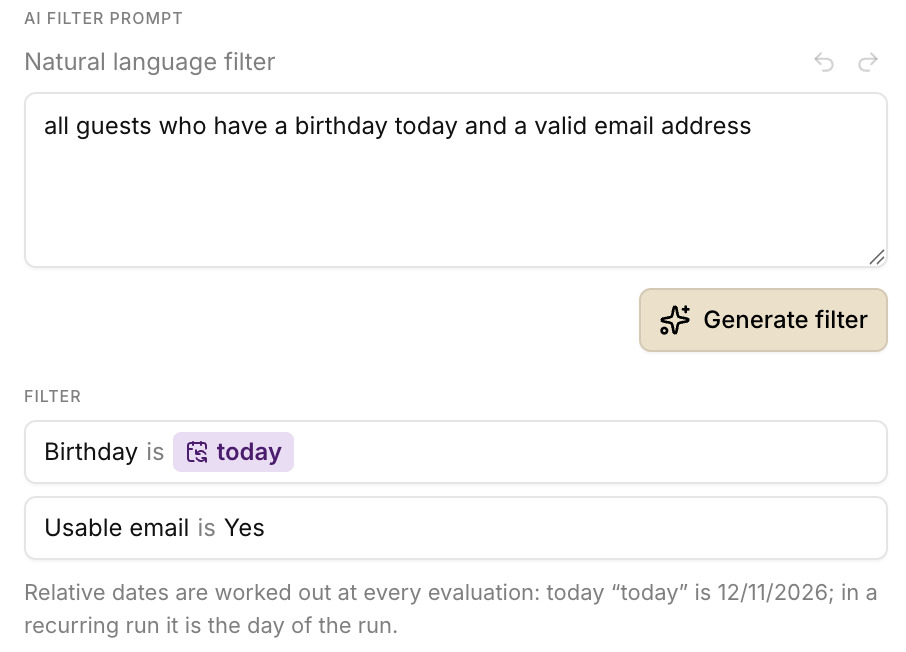
Campaigns with dynamic date values
- Campaigns use dynamic date values: filters such as “arrival today” adjust automatically to the current day
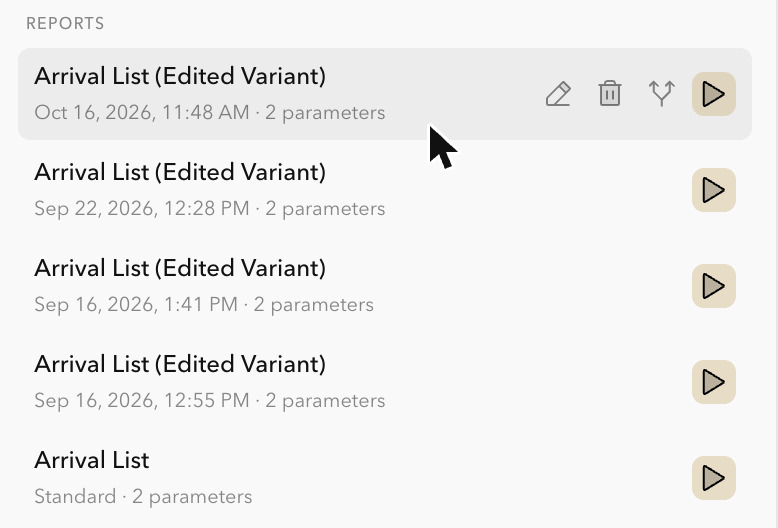
Open SmartOffer templates from the chat
- SmartOffer templates can be opened directly from the agent chat
User manual in felixUnity
- The user manual is available directly in felixUnity and is kept up to date automatically
Browse and search the manual
- New previous and next buttons make it easier to page through the manual sections
- Search results are kept when a manual page is opened, search terms are highlighted and can be stepped through
New ID document reading
- Smart Check-in uses a new method for reading identity documents
All versions
New
- New felixUnity logo with modern white lettering on a black background
- Consistent design: blue buttons, links and focus frames make for a clear and appealing interface
Improved and fixed
- Focus frames are now blue as well, which improves usability
- The module name has been restyled and now appears as “felixUnity”
- The tab icon adapts better to the browser’s dark mode and is now white
New
- Password error messages are now available in German, which makes signing in easier to understand
Improved and fixed
- Sign-in buttons stand out more thanks to the new shade of blue
New
- Invoices can be sent by email
- Before check-out, the booking is checked for full payment
- Reservations and deposits load much faster in the room chart
- Guest registration reporting offers more settings
- The dialog for booking guest expenses shows only matching expense items
Improved and fixed
- Reservation data and prices are corrected reliably after an early check-out
- Only companions who are actually present are taken into account
- The reservation is saved before an invoice is created, so no data is lost
- The choice of invoice address is easier to understand
- Group category changes before room assignment work without errors
- Month navigation in the reservation plan and the tooltips are improved
- Actions in the group payment dialog are sorted by importance
- Unavailable actions are disabled for unsaved reservations
- The order of guest names stays as before
- Prices and payments accept decimal commas
- The timeline in the room chart can also be moved by holding the right mouse button
- Service offers and the arrangement selection are sorted alphabetically by display name
- The length of stay dates in reservations adjusts better and without unwanted warnings
- Cancelled bookings and deposits are shown correctly in the cash journal
- Errors when deleting reservation services (arrangements) have been fixed
- The guest letter entry is taken into account when offers are sent
New
- The Tasks module is integrated and can be used from other modules, with direct links to tasks
Improved and fixed
- Tasks are easier to open
New
- Modules load faster because connections are set up early
Improved and fixed
- Sign-in is faster
New
- The dashboard has been redesigned around the four key questions of a hotel manager: Today, Occupancy, Rooms and Finance
- The previous five department views are available again, including the Management page with the key figures
Improved and fixed
- Figures come from a single source in all dashboards, and missing or faulty data is clearly shown
- The financial figures are visible again and carry a note explaining that different kinds of revenue are shown together
- Navigation was corrected after feedback so that all areas can be reached as usual
New
- The arrivals list can be sent by email with a new shortcut
- Rooms can be created by voice command, and a card for approval appears before they are created
- Answers from house knowledge always name their source
- Current AI models are supported, so answers become more precise and reliable
Improved and fixed
- A warning appears for similar existing entries when services are created, so no duplicates arise
- Manual answers link reliably to the matching sources and links again
New
- Arrival card shows only useful actions: “Review check-in” is clearly displayed, and checked-in reservations show the status “Checked in”
- Reservations can be opened in Felix Web with one click
- Manual answers link directly to the matching pages in the Unity manual
- The guest view in the hotel follows the current daily closing and no longer shows historical bookings
Improved and fixed
- Services, packages, prices, companies and events can be created in master data again
- The check-in review gives clear notes instead of greyed-out buttons
- Extensions are still requested through the chat and can no longer be selected directly in the row
- Incorrect status messages in email sending corrected
New
- Changes to a stay and room requests appear as reviewable cards with an availability check and guest consent, and after confirmation the offer is created in the SmartOffer workflow
- Arrivals overview with housekeeping status as well as guest and room information in arrival and departure lists
- Complete Excel exports of services with group assignments
- Manual access directly in the system for questions about Felix and felixUnity
Improved and fixed
- More precise guest and reservation search with suggestions for ambiguous names
- More stable SmartOffer editor, including for large templates
- Error messages no longer block the chat
- Consistent display of guest and room names in movement lists
- Front office workflows with precise reservation selection and verified check-ins
New
- The preview when creating a segment loads immediately after a filter is generated
- Campaigns use dynamic date values: filters such as “arrival today” adjust automatically to the current day
Improved and fixed
- Filters in natural language are evaluated more clearly, which reduces misinterpretations
- Attachments are filed in a better organised way in GMS Unity
New
- SmartOffer templates can be opened directly from the agent chat
Improved and fixed
- The user list loads faster and stays smooth even with many users
- Loading times in the user overview are much shorter
New
- The chat page is preloaded automatically after the system restarts
Improved and fixed
- Less delay on the first page view after a restart
Improved and fixed
- The application loads faster
New
- The first visit to the chatbot loads much faster, including for new sessions or in private browsing mode
Improved and fixed
- The loading time of the chat interface was optimised
New
- Discounts can be selected and applied to individual reservations
- The main guest’s surname is carried over when adding new companions
- Companions are classified by their age at arrival
- Planned deposits are included in offer variants
Improved and fixed
- Saved categories are kept when editing groupings
- All charges from the invoice area can be returned to the guest address
New
- The chat adopts the language of the embedding website for greeting, placeholder texts and buttons
- Each chat embed can show its own logo
- Answers appear step by step as they arrive
- Hotel information can be queried via API
Improved and fixed
- Chat buttons adapt to the screen size, even with long labels
- Chat settings are up to date immediately
- Input taken over from the website lands in the chat window and is sent automatically when needed
New
- The user manual is available directly in felixUnity and is kept up to date automatically
- New previous and next buttons make it easier to page through the manual sections
- Search results are kept when a manual page is opened, search terms are highlighted and can be stepped through
Improved and fixed
- Drafts in the manual automatically show the most recently approved version
- The manual navigation works with screen readers
New
- felixUnity can also be used on a smartphone, with a menu in the top bar and a slide-out sidebar
Improved and fixed
- Menus, tables and search are easier to use on small screens
Improved and fixed
- The overview always shows current information on the AI budget and on updates
New
- The complete guest data is always displayed correctly
Improved and fixed
- The calculation setting of a reservation is kept
- For manual bookings on guest accounts, all required information is transmitted
New
- The order of reservation names was adjusted for a clearer overview
- Discounts and net prices are passed on to SmartOffer, which makes offers more precise
Improved and fixed
- Price reductions are billed and displayed better
New
- Campaigns can be created and sent in several languages
- Each guest receives the campaign in their preferred language
Improved and fixed
- German, English, Spanish, French, Italian and Dutch are supported
- If no matching language is available, the English version is sent, otherwise the German one
- Subject, preview text, message and design can be adapted for each language
- Later send attempts always use the correct language version
New
- Checkout after closing an invoice works more reliably with current data
- More personal address through the use of the first name in guest communication
Improved and fixed
- Clearer explanation for booking conflicts with fixed fees
- Combined services appear transparently in the overnight prices on the invoice
- The checkout question is selected more precisely based on the current business date
- Crash with numeric day entries for service bookings fixed
New
- Guests with the setting “No mass emails” are recognised and excluded from sending
Improved and fixed
- The reasons why guests are excluded from a mailing are visible in the preview
- The AI filter shows an understandable message in the filter editor when errors occur
- Search and selection of guests take “No mass emails” into account more efficiently
New
- Guest addresses are provided in more detail and separately in SmartOffers
- After an invoice is settled, checkout can be started directly
Improved and fixed
- Deposits are limited to the remaining amount
- Open invoice items show the associated reservation numbers
- Unit prices on invoices are shown separately from line totals
- Tabs in the reservation area stay smooth even with quick switching
- The normal reservation button is available again in the assistant view
New
- The reservation assistant shows phone enquiries for easy manual review
- Reservation discounts from extras are applied to the total price and the invoice
- Room charts and extras show the hotel’s own symbol texts and images
- Advance payments can be planned and managed better, including up to two instalments
- Bookings are locked while being edited, and live notes show ongoing edits
Improved and fixed
- Arrangement services can be booked in advance and edited afterwards
- Cancelled services can be moved
- Guest expenses can be printed directly as a receipt
- Excel export with flexible column selection
- Group enquiries can be edited more flexibly, including the booker type
New
- Search fields in selection menus receive focus automatically when opened
New
- The system now sends emails for all connected apps, not just for SmartOffer
- Message attachments are archived automatically in the guest document
- The inbox and delivery status show which app a message came from
Improved and fixed
- Archiving and document access also work with custom domain names
- Inline file attachments can be embedded in messages and sent directly
New
- Email attachments from the CRM can be saved directly on the guest, such as offers or invoices, even if there is no reservation yet
Improved and fixed
- Storage supports PDF, PNG, JPEG, GIF and WebP files
New
- The segment preview shows all filter fields as separate columns with colour-coded headings
- Every column can be sorted
Improved and fixed
- Background requests are processed more reliably, with better loading times and stability
- The previous tags area was removed, and only relevant fields appear
- Unsaved changes are visibly marked when creating filters
New
- The user overview adjusts column widths dynamically
- The administration area makes better use of large screens
Improved and fixed
- The layout adapts smoothly when the window changes, so no information is lost
New
- Clear, visible status display for tasks: blocked, completed or in progress
- Only the tools that match the user’s permissions are shown
Improved and fixed
- Important clarifications are no longer overwritten by incomplete tasks
- Global analyses stay stable even with errors or missing data
- Fewer unnecessary error messages and better performance through fewer tool accesses
New
- The user overview shows up to three important entries directly and groups further ones behind a plus symbol
Improved and fixed
- Tables adapt better to different screen sizes and avoid unnecessary horizontal scrolling
New
- Smart Check-in uses a new method for reading identity documents
Improved and fixed
- The admin area has been reworked: clear side drawers instead of modal windows, with a consistent colour scheme
New
- Improved reliability when recording arrivals
- Real cancellations are now correctly told apart from missing data
Improved and fixed
- Active bookings without arrival data are no longer wrongly treated as cancelled
- Room occupancy is no longer marked incorrectly when room-move data is missing
New
- Modules are available in your own language
- Improved keyboard navigation in some modules
New
- Budget feature: current usage is shown in the side panel from 80% utilisation
- Colour coding: yellow from 80%, red from 90%
- Readable notes on the remaining budget and reset times
Improved and fixed
- Budget rings are no longer covered by other elements
- Reliable connection detection reduces disruptions
- Limit for multi-step tasks raised, clearer error messages
New
- Invoice addresses can now also be changed on existing invoices
- Reservations can be edited through the cancellation function instead of being deleted
- Invoices can be transferred between records more easily
Improved and fixed
- The bin icon for services is larger and easier to see
- Guest forms and the guest list are more user-friendly
- Merging and splitting entries is more stable
- Moving room bookings within group reservations no longer flickers
New
- Invoice views are saved and applied individually
- Invoice windows open automatically for quick access
- Improved search for invoice addresses
- Invoices can be cancelled instead of deleted
Improved and fixed
- Optimised merging and splitting of reservations
- Improved price lookup and room plan updates
- Smart Offers are saved automatically before they are sent
New
- You can switch between modules directly in the application, and the module selection is clearer
New
- Cancelled invoices are clearly marked with a red "Cancelled" flag and have their own tab
- Invoice windows can be moved, minimised and resized
- Invoice payment methods can be added with the plus button and deleted if needed
- Reservation details are flexibly adjustable: enlarge the panel vertically and drag it upwards
Improved and fixed
- Deposits, services and guest expenses can be cancelled directly on the invoice
- Prepayments, cancellations and partial payments are processed correctly
- The month view in the reservation calendar starts three months before the current date
- Arrangements can be edited manually
New
- Templates for SmartOffers make email campaigns easier
- Campaigns are saved as drafts so no content is lost
Improved and fixed
- Improved saving of campaigns that contain blocks in the editor
- Support for multiple languages in email templates
- Optimised loading times and stable connections for API requests
New
- Chat buttons adapt automatically to the browser language
- Suggestion buttons disappear automatically after the first message
Improved and fixed
- Fewer error messages when the chat starts
- Chat button translations for a more natural chat experience
New
- Real-time voice function for fluid two-way conversations
- Live weather information built directly into voice conversations
- Improved speech processing thanks to the latest AI technology
Improved and fixed
- Optimised connection for voice streaming directly in the browser
- Precise and up-to-date weather information in chat and voice mode
New
- Tracking of delivery failures for more reliable delivery
- Offers can be downloaded directly
- Additional recipient options when sending offers (CC and BCC)
Improved and fixed
- Improved display of offer attachments in messages and emails
- Updated translations for French and Italian
New
- The info bubble in the embedded widget can be moved by drag and drop
- Its position is saved when you leave the page
Improved and fixed
- More stable experience when moving the info bubble
New
- The sender of emails can be set individually so that messages are easier to recognise
New
- New user guidance with a fresh, modernised design
- Reports and variants can be renamed
- Clearer notes when embedding content
Improved and fixed
- Clearer button labels in workflows
- Optimised state management for more stable workflows
- Noticeably improved overall performance
New
- Page titles in the browser tab show the current content and make it easier to switch between pages
Older versions are available on request: office@felixunity.ai.
As of today
Confirmed figures. Impact metrics will follow.
- felix on the market
- since 1980GMS has been developing felix since 1998
- Verified integrations
- over 400Channel managers, OTAs, payment, POS, accounting